Ramalama AI Video Generator — Halloween Costume Walk
Make a Ramalama Halloween AI costume walk from one photo. Try witch, vampire or skeleton prompts, create a vertical reveal, then add the Bang Bang sound.
Prepared by the site team · Updated October 16, 2026
What makes a Ramalama costume walk?
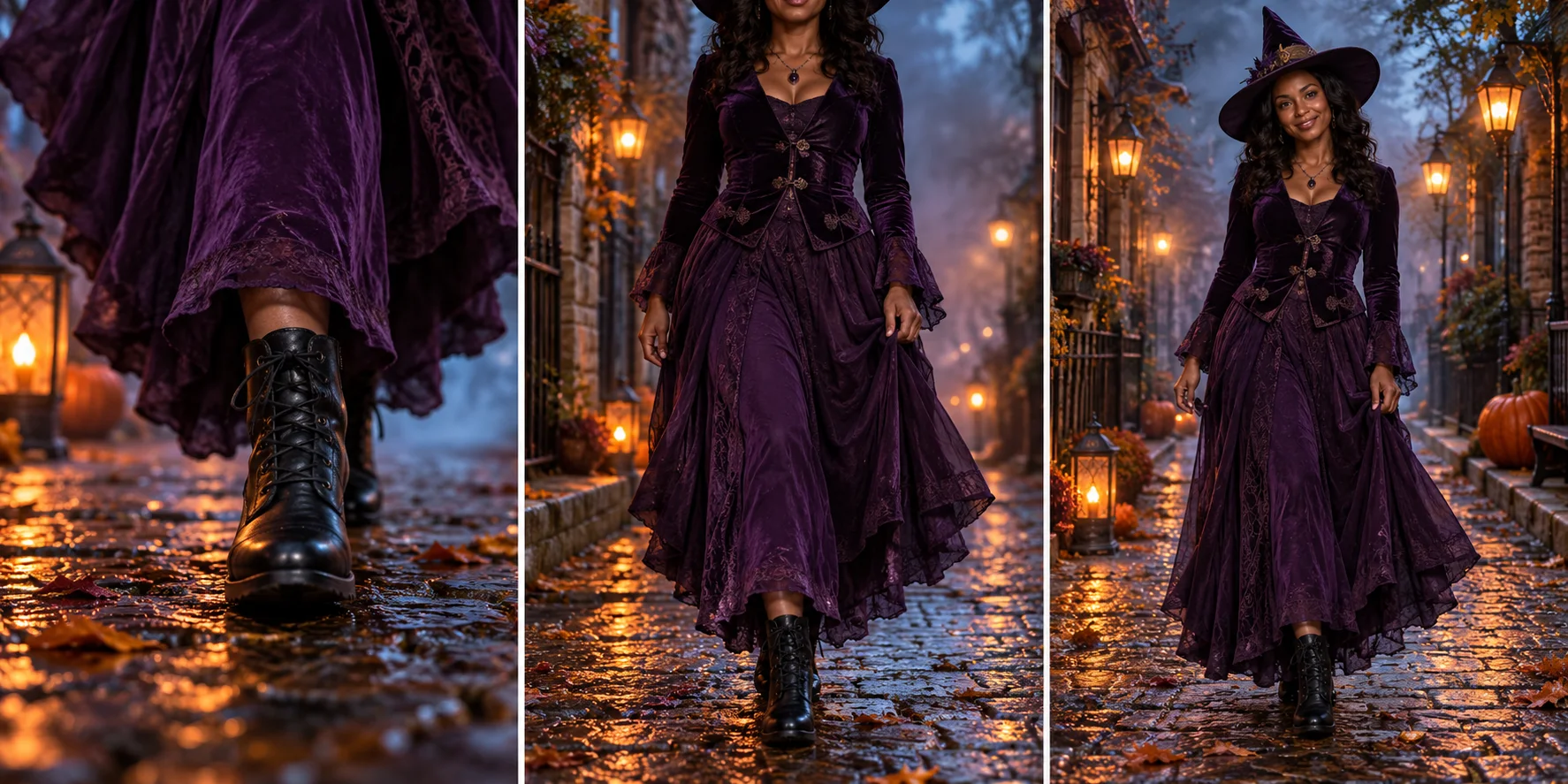
A Ramalama Halloween AI video builds anticipation with shoes, then reveals the person wearing the costume. The useful part is the camera progression: a grounded walk, an upward tilt and a held final look. It is a costume reveal rather than a complicated dance routine.
AI concept storyboard — not a generated video result.
The three beats
01 · Shoes first
Start low enough to hide the face. Two deliberate steps establish the outfit and leave room for anticipation.
02 · Tilt upward
Move from boots to costume to face in one readable camera motion. Ask for a steady outfit rather than a mid-shot transformation.
03 · Hold the reveal
Let the face and full look settle before the clip ends. Use that hold when trimming the reveal to your chosen sound.
Ramalama Halloween costume ideas and prompts
Choose a human costume reveal or a separate pet walk. Loading a direction changes only the editable prompt; your photo and video settings stay in place. Review the photo and current credit quote before generating.
Midnight witch
Purple velvet, sturdy black boots and warm street lanterns. A clear silhouette for a slow, confident reveal.
Read the full prompt
Create an original 15-second vertical Halloween costume walk using @Image1 as the only adult subject. Preserve their facial identity, skin tone and build. Dress the subject in an original midnight-purple velvet witch outfit with a pointed hat, flowing skirt and black ankle boots. Place them on a wet cobbled street with autumn leaves, pumpkins and warm lanterns. Start at pavement level with a close view of the boots taking two slow, grounded steps toward the camera. Track backward smoothly. Keep the face hidden during the opening. Around the middle of the clip, tilt the camera upward in one continuous move to reveal the complete costume and recognizable face. End on a calm confident pose looking toward the lens, with a short hold for editing. Keep the same outfit throughout, natural legs and hands, steady foot contact and readable lighting. No extra people, costume morphs, dialogue, captions, logos or copied footage. Silent clip; music will be added separately.
Velvet vampire
A burgundy cape against cool stone. Keep the cape behind the shoulders so the face stays readable.
Read the full prompt
Create an original 15-second vertical Halloween costume walk using @Image1 as the only adult subject. Preserve their facial identity, skin tone and build. Dress the subject in an original burgundy velvet vampire cape over a black tailored suit and polished boots. Set the walk in a moonlit stone courtyard with two warm lamps. Keep the face unobstructed and the cape behind the shoulders; no blood or fangs close-up. Start at pavement level with a close view of the boots taking two slow, grounded steps toward the camera. Track backward smoothly. Keep the face hidden during the opening. Around the middle of the clip, tilt the camera upward in one continuous move to reveal the complete costume and recognizable face. End on a calm confident pose looking toward the lens, with a short hold for editing. Keep the same outfit throughout, natural legs and hands, steady foot contact and readable lighting. No extra people, costume morphs, dialogue, captions, logos or copied footage. Silent clip; music will be added separately.
Skeleton streetwear
A simple bone-print outfit and white sneakers. Broad graphic shapes read better than tiny glowing details.
Read the full prompt
Create an original 15-second vertical Halloween costume walk using @Image1 as the only adult subject. Preserve their facial identity, skin tone and build. Dress the subject in an original black bone-print streetwear outfit with white sneakers, without a mask or face paint. Set the walk on a quiet autumn sidewalk under soft amber streetlights. Keep the bone-print pattern simple and stable. Start at pavement level with a close view of the boots taking two slow, grounded steps toward the camera. Track backward smoothly. Keep the face hidden during the opening. Around the middle of the clip, tilt the camera upward in one continuous move to reveal the complete costume and recognizable face. End on a calm confident pose looking toward the lens, with a short hold for editing. Keep the same outfit throughout, natural legs and hands, steady foot contact and readable lighting. No extra people, costume morphs, dialogue, captions, logos or copied footage. Silent clip; music will be added separately.
Pet pumpkin walk
One cat or dog in a pumpkin cape, walking naturally on four paws. Use a full-body photo; this is an original direction, not the kitten reel.
Read the full prompt
Create an original 15-second vertical 9:16 Halloween pet costume walk. @Image1 is the ONLY pet identity. Preserve its species, breed, muzzle, eyes, ears, fur colors and markings. One pet only. A small orange pumpkin cape sits behind the shoulders, face uncovered. On a quiet lantern-lit autumn path, start low with paws taking two slow steps toward the camera, then smoothly tilt up to the recognizable face and costume. Keep four paws and natural animal anatomy; no human hands, upright human gait, extra animals or costume morphing. End with a gentle head tilt and a short hold. This is an original scene, not a recreation of a reference reel. No speech, text or logos. Silent clip; add music separately.
Which photo works best?
For an existing costume, use a full-body image with the shoes, outfit and face visible. Avoid mirror reflections, crossed legs and a cape covering the face. If you want a new outfit from a portrait, name the costume explicitly and expect the model to invent unseen details. These prompts use Photo 1 for one adult identity; no sample artwork is added to your materials.
How to add Ramalama (Bang Bang) and time the reveal
Generate the silent clip first. In your publishing app or editor, choose a sound available for your account and intended use. Locate the accent where you want the reveal, then trim or reposition the clip so the upward tilt finishes there. Preview the complete post with audio before publishing. This is manual editing; an AI camera move may need a new take.
AI generation or a CapCut template?
Choose this creator when you want a new scene, an editable outfit and your own photo. Choose a CapCut template when your priority is the existing arrangement of cuts and sound. AI generation gives you creative control over the setting, but the camera movement and reveal timing can vary between takes.
Before you export: common reveal problems
What you see
What to change
Sliding feet or extra steps
Request two slow steps with firm ground contact. Remove extra actions; inspect both shoes before using the clip.
Face shown too early or lost after the tilt
Keep the low opening and final face reveal explicit. Use a sharp reference, simpler hat and unobstructed lighting.
Reveal misses the music accent
Trim and reposition the clip against the chosen sound. If the camera never completes the tilt, revise the prompt and generate again.
More Halloween video ideas
For a pet, choose Pet pumpkin walk and upload one full-body cat or dog photo with clear fur markings. It requests natural four-paw motion, not the upright, multi-costume kitten reel. Pet and human directions are unverified creative presets; groups and automatic costume changes are not offered.
Genjutsu AI and Media.io describe the low-angle walk and costume reveal. Their template, speed and music claims belong to their own products; this page uses the editable workflow described above.
Use one sharp, well-lit photo with a clear face. A full-body costume photo with visible shoes gives the model more outfit detail; a portrait asks it to invent the rest. Photo 1 is the only walker.
02
Choose a costume direction
Start with the witch prompt or explicitly load vampire or skeleton below. Edit the outfit and street setting. The default is a silent 15-second, 9:16 Mini clip; check the current model, resolution and credit quote.
03
Review the reveal and add sound
Generate and inspect the feet, face and upward camera move. Download the MP4, add the available Ramalama (Bang Bang) sound in your publishing app, then trim the reveal to the beat.
Give your idea a head start.
The storyboard is original AI concept artwork, not frames from a generated video. The human and pet directions have not yet been validated as completed clips.
For recognizable shoes and clothing, upload a full-body photo in the desired costume. For a new costume, edit the prompt; precise outfit changes and facial likeness can vary.
A single walker, two slow steps and one camera tilt are easier to direct than costume changes, a group dance or multiple cuts. Leave space above the hat and below the shoes.
The default clip is silent. Original music, exact choreography and automatic beat synchronization are not included. Review the result before adding your sound and captions.
A few questions, answered.
Get to know ramalama ai video generator — halloween costume walk before you start.
What is the Ramalama Bang Bang trend?
The Halloween costume-walk format starts with a low view of shoes and legs, then tilts up to reveal the outfit and face. Creators pair the reveal with Róisín Murphy’s Ramalama (Bang Bang). Ramalama Halloween AI and Ramalama costume walk refer to this same video-making intent.
How do I make a Ramalama AI video from my photo?
Upload one adult photo as Photo 1, choose a costume prompt and review the 15-second vertical settings and credit quote. Generate an original clip, inspect the reveal and download it. Add the song and adjust the timing separately in a video or publishing app.
Does the Ramalama video include the original song?
No. The default Mini preset is silent. Use a sound available for your account and intended use in TikTok, Reels or another editor. Align the finished reveal to the track afterward; this page does not supply a music license or automatic beat matching.
Is this the official CapCut Ramalama template?
No. This is an independent AI creation workflow with editable prompts. It does not open a CapCut project or reproduce a fixed source clip step for step. Use an actual CapCut template if you need its exact cuts, motion and audio arrangement.
Can I upload a selfie instead of a full-body costume photo?
Yes, but the model must invent the unseen body, clothing and shoes. A sharp full-body image with an unobstructed face is a better reference for preserving an existing outfit. A face-only selfie cannot lock details that are absent from the photo.
Can I make a Ramalama video with my cat or dog?
Choose Pet pumpkin walk below and upload one clear full-body pet photo. It requests one animal walking naturally on four paws in a pumpkin cape, not the upright multi-costume kitten reel. Review the output; couples and groups are not included.
Is Ramalama AI generation free?
Browsing the prompts is free. Generating a video requires an account and credits, with the current quote shown before submission. Confirmed failed tasks restore deducted credits. Completed results use credits even when creative details vary.