Black Cat Clapping Meme Generator
AI sample · 8s · 480p · Silent
Make your own clapping cat video from a pet photo: a toothy grin, tiny human-like hands and a slow sarcastic clap. Choose a green-screen reaction, a kitchen scene or a person-and-cat story in the shared creator.
Start with: One reference imageThe grin, the hands, the slow clap
The joke is the cat applauding something that barely deserves applause. Give it one short caption, leave a pause between claps, and let the strange grin do the rest.
Choose green screen for a reaction overlay, the kitchen for a standalone pet post, or the two-photo story for the treat-and-clap setup. Add text after downloading so it stays legible. The MP4 needs chroma key for an overlay; there is no built-in caption editor or transparent GIF export.
Caption ideas for your own edit
“Me congratulating myself for replying to one email.” · “When my friend calls another impulse buy an investment.” · “The group chat after a truly terrible suggestion.”
Where the format comes from
These are original editable prompts, not source-video motion transfer. The preview is one real 8-second green-screen Mini sample. Its green background has shadows and uneven color, so chroma key may need cleanup. The kitchen and two-photo story versions have not been visually tested. Hand anatomy, claps and likeness can vary.
Choose your next creative step
Change the starting material, the subject, or the movement. Here is where each tool helps.
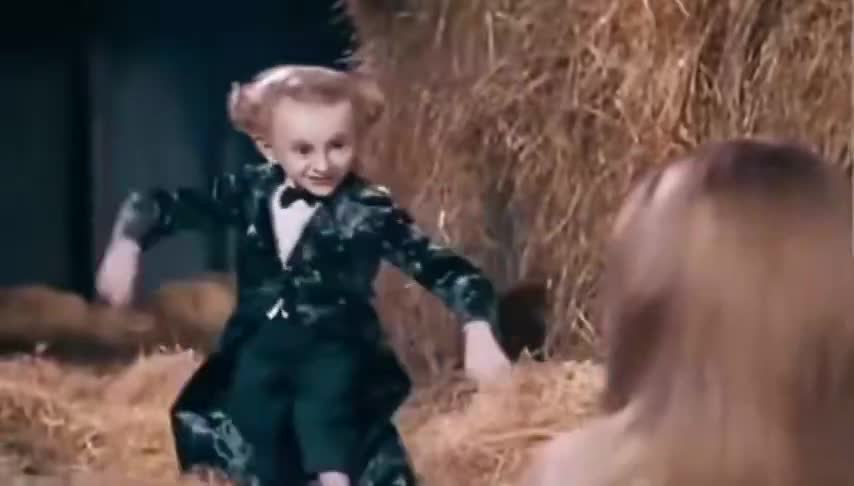 Photo + original music
Rumpelstiltskin AI Meme Video Generator
Choose the dancer, spectator or both for a new Rumpelstiltskin barn dance video. Upload portraits, edit the prompt and select music in the shared composer. AI movement and likeness can vary.
One reference image Photo first
Image to Video
Keep an existing image as your visual starting point.
One reference image
Text to Video
Try a different setting without preparing a reference image.
A written scenePrepare. Direct. Review.
Use these three steps to give your scene a clear direction.
Back to the creator- 01
Upload your cat
Photo 1 is your cat. Use one well-lit animal with visible ears, face and body. Any fur color works. For the story version, add one adult person as Photo 2.
- 02
Load a clapping preset
Start with the 8-second green-screen reaction. Load the kitchen version or 10-second treat-and-clap story explicitly; your photos stay, and the prompt remains editable.
- 03
Review and make the joke
Check the grin, hands and clap motion, then download the MP4. Add your caption and sound in an editor. For green screen, apply chroma key before placing it over another scene.
Give your idea a head start.
- The preview is one real 8-second Mini 480p silent generation using an AI-created cat reference. The green background has shadows and uneven color; chroma key may need cleanup. The kitchen and two-photo story presets have not been visually tested.
- Keep Photo 1 as the cat and Photo 2 as the person. Choose a model that supports multiple reference images for the story; the default Mini supports this.
- Keep the ears, hands and feet in frame. Three slow claps are easier to read than rapid applause or a chain of extra actions.
- A solid green background is a generation request. MP4 is not transparent; clean edges, seamless looping, hand anatomy and background consistency can vary.
A few questions, answered.
Get to know black cat clapping meme generator before you start.
What is the black cat clapping meme?
It is an AI-assisted reaction format featuring a grinning black cat with human-like hands slowly applauding. People pair it with captions for sarcastic approval, a tiny achievement or a questionable decision. The defining elements are the smile, the hands and the slow clap.
Can I use my own cat, even if it is not black?
Yes. Photo 1 guides the cat identity and fur markings. The prompt adds the fictional grin and human-like hands. Use one sharp, well-lit pet photo; likeness and anatomy can vary.
Can I make the version with a person feeding the cat?
Choose the person-and-cat story and click Load this preset. Photo 1 is the cat; Photo 2 is one adult person. The 10-second prompt requests a treat, the cat clapping and a deadpan human reaction. Use a multi-image model such as the default Mini and review the current quote.
Does it export a transparent GIF or the original green-screen clip?
This workflow generates a new MP4. The green-screen preset requests an even green background, which you can remove with chroma key in CapCut or another editor. It does not export alpha video, a transparent GIF or a licensed copy of the original meme.
Does the clapping video include the meme sound?
The default Mini option is silent. Add your own clapping sound, music and caption afterward. If you choose an audio-enabled model, its output is original generated audio rather than the original viral recording.
How much does it cost?
Generation uses credits, with the actual quote shown before submission. The current Mini presets quote 31 credits at 480p or 66 at 720p for 8 seconds, and 38 or 82 for the 10-second story. Other settings change the price. Confirmed failed tasks restore deducted credits; a completed result is charged even if its creative details differ.
A little guidance for your next creation
Your turn to make it happen.
Start with the example. Then add your own perspective.