Crazy Frog AI prompt: build an original invisible-bike chase
Make the invisible-motorcycle chase with the right inputs. Separate reference-video motion transfer from an original photo animation, then check the rider, pursuer and soundtrack.
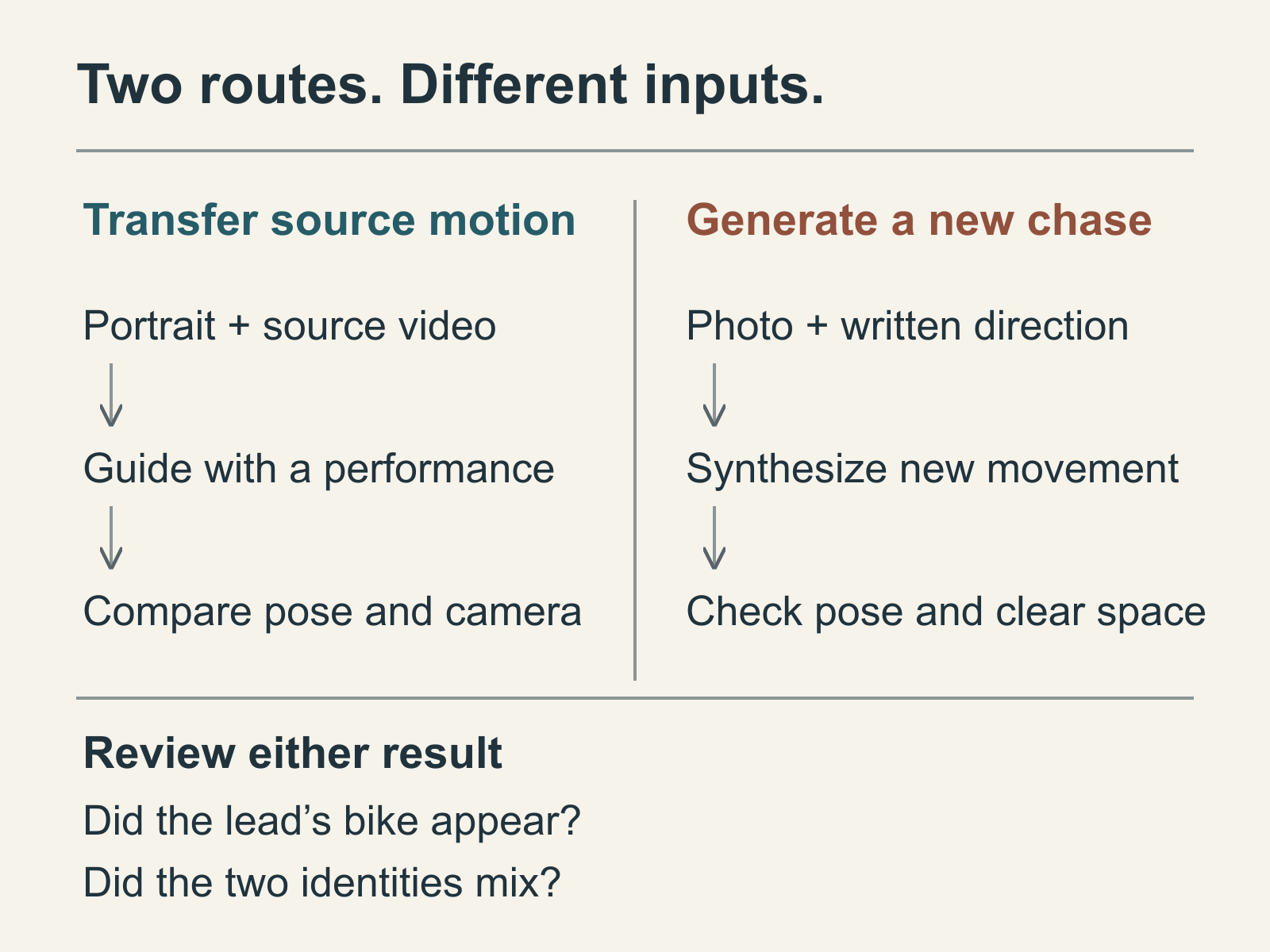
The invisible bike is the joke in a Crazy Frog AI chase. The rider sits on nothing, holds imaginary handlebars and glides along the road while a pursuer follows on a visible motorcycle. For an original version, begin with one short shot that makes that pose readable. A new photo animation can use the idea without preserving the performance, camera moves or cuts of a particular clip.
Give each photo a clear job
Use a clear, permitted photograph of the adult rider with enough of the body visible to establish clothing and proportions. A crouched or seated pose with bent knees and visible hands is more useful than a face-only selfie. Leave space beneath the feet and behind the rider. The model otherwise has to invent both the missing body and the chase at once.
In Kadenly’s Image to Video, the shared Mini composer supports multiple image references. Other models have their own input limits, so read the selected model’s limit rather than assuming that every option accepts the same photos. Match the prompt to the visible material labels: @Image1 should identify the rider, not an unrelated background picture. Keep that image selected when generating.
For a first attempt, use one identity and an anonymous pursuer. That leaves one recognizable face to check. If a friend needs to be the pursuer, upload a separate photograph and give that image its own role instead of placing two faces in the rider’s photo.
Start with one eight-second chase shot
The brief below is an original prompt you can copy and edit. It has not been validated as a finished video. Choose a compatible model, supported duration and vertical ratio, then review the live credit quote. Copying or editing the text does not start a paid task.
Create one original eight-second vertical comedy shot using @Image1 as the adult rider’s identity and clothing reference. On a quiet road with no other traffic, the rider holds a compact seated crouch in midair, knees bent, hands separated around imaginary handlebars. They glide forward with an amused, focused expression while an anonymous adult pursuer follows behind on a clearly visible ordinary motorcycle at a safe distance. Track beside the rider in one steady medium-wide shot. Keep the rider’s face, hands and bent legs visible. Only the lead rider’s motorcycle is invisible: no bike body, wheels, seat, engine or physical handlebars beneath or around the lead rider. Keep the pursuer’s separate motorcycle visible; do not remove both vehicles. Keep the two people distinct, feet and anatomy plausible, no collision, dialogue, text or music. Silent visuals; add the chosen sound after editing.
Keep the first attempt simple: one road, one camera move and a pursuer who stays behind. Adding a flip, a tunnel, several cuts and a new outfit gives you more ways for the body or identity to change. If you want a different setting, change the road description while preserving the same pose and roles.
For two recognizable people, a shorter cast instruction can replace the anonymous-pursuer sentence. Use it only after both identity images are uploaded and selected, and adjust the aliases to match the labels you actually see:
@Image1 supplies only the rider’s face, hair and clothing. @Image2 supplies only the adult pursuer riding the visible motorcycle behind. Keep these two identities separate in every frame. The pursuer never sits on the invisible bike, and the rider never inherits the pursuer’s face. Preserve one continuous side-tracking shot and a clear gap between them.
Two references make the roles explicit; they do not guarantee stable faces or precise riding motion. If the relationship becomes hard to read, return to the one-identity version before lengthening the clip.
Generate a usable insert, then assemble the edit
For a clip you will score later, choose a model option marked Silent as well as requesting no music in the prompt. Once generation finishes, play the whole result before downloading a passage for your edit. Keep the cleanest continuous stretch rather than filling the timeline with frames that already have broken hands or a changing face.
Pause around the hands and lower body. A motorcycle can appear halfway through a result that started correctly: look for wheels, a seat or physical handlebars growing into the lead rider’s empty space. The pursuer’s bike should remain visible and separate. Check whether the knees hold the seated pose, whether the rider becomes the pursuer and whether the following person merges with the lead as the camera moves. Those are reasons to simplify the action or improve the starting image, not reasons to hide the mistake under faster cuts.
Import the usable shot into CapCut or your editor, select the intended sound there, and trim the picture against that excerpt. If you need an opening or closing insert, generate it as a separate small task using the same identity images and visible clothing; expect to check continuity rather than assuming separate generations will match. A still pause or a clear change in camera distance can make a cleaner edit than pretending two different body positions form one uninterrupted action.
Kadenly does not upload your chosen track or automatically synchronize cuts to it. The Crazy Frog official site can help identify the character and official Axel F video; it does not grant a music licence for your export. Use a sound available for your account and intended use, then watch the exported picture and audio together.
When the source performance itself matters
If you need a particular clip’s movement, a written brief is the wrong input to rely on. Higgsfield Genjutsu’s official page distinguishes Motion Transfer from Object Swap. Check its current motion-transfer input requirements and use a permitted source video with a clear subject image. If a second identity is essential, confirm that the chosen operation supports it before submitting. This is an external route, not a Kadenly integration or a quality endorsement from a paid test.
Kadenly’s current motion-transfer page is a preparation preview. The original chase above is new image-guided motion, not an exact Crazy Frog source-video replacement. Choose between those outcomes before paying for a generation.